Rules for the Machine
A macOS annotation tool that turns writing corrections into rules your AI follows
13 min read
At a glance
- Role
- Solo builder (personal project)
- Problem
- AI writing tools can't learn your voice
- Solution
- Annotations that compound into enforced writing rules
- Impact
- 85% rule compliance after self-improving optimization loop
TL;DR
Most AI writing tools treat every session as a blank slate. You correct the same mistake, the same phrasing, the same flat corporate tone, and next time you correct it again. Margin is a macOS annotation app built to break that loop. You mark up AI-generated text with corrections and voice signals. Those corrections compound into a structured writing guide your AI reads before it writes anything.
I built it as a solo project during a job search, shipping features across Tauri, React, SQLite, and a Python ML pipeline. The result is a local-first annotation tool with a self-improving prompt system, and a proof of concept that a PM who uses AI aggressively can build real software without a dedicated engineering team.
Impact:
- 78% → 85% rule compliance after GEPA self-improving optimization loop
- Six prompt architectures evaluated against 258 corrections and 272 rules
- Annotation-to-rule latency: zero (every correction becomes a rule automatically)
- Annotations export to any AI agent via CLI — Claude, Codex, or custom
- Full design token audit: WCAG AA contrast failure identified and fixed in one pass
Context
Why I built it
I was using Claude heavily for writing: cover letters, PRDs, outreach, blog posts. The output was competent but generic. I kept adding the same corrections to every draft: stop with corporate buzzwords, don't end with a summary paragraph, write short sentences after long ones. There was no way to give Claude a persistent memory of what I actually sound like.
The tools that existed were either too lightweight (a simple system prompt file) or too heavy (full prompt engineering platforms that assumed you were building products, not writing for yourself). I wanted something that lived on my machine, required no account, and got smarter the more I used it.
What it is
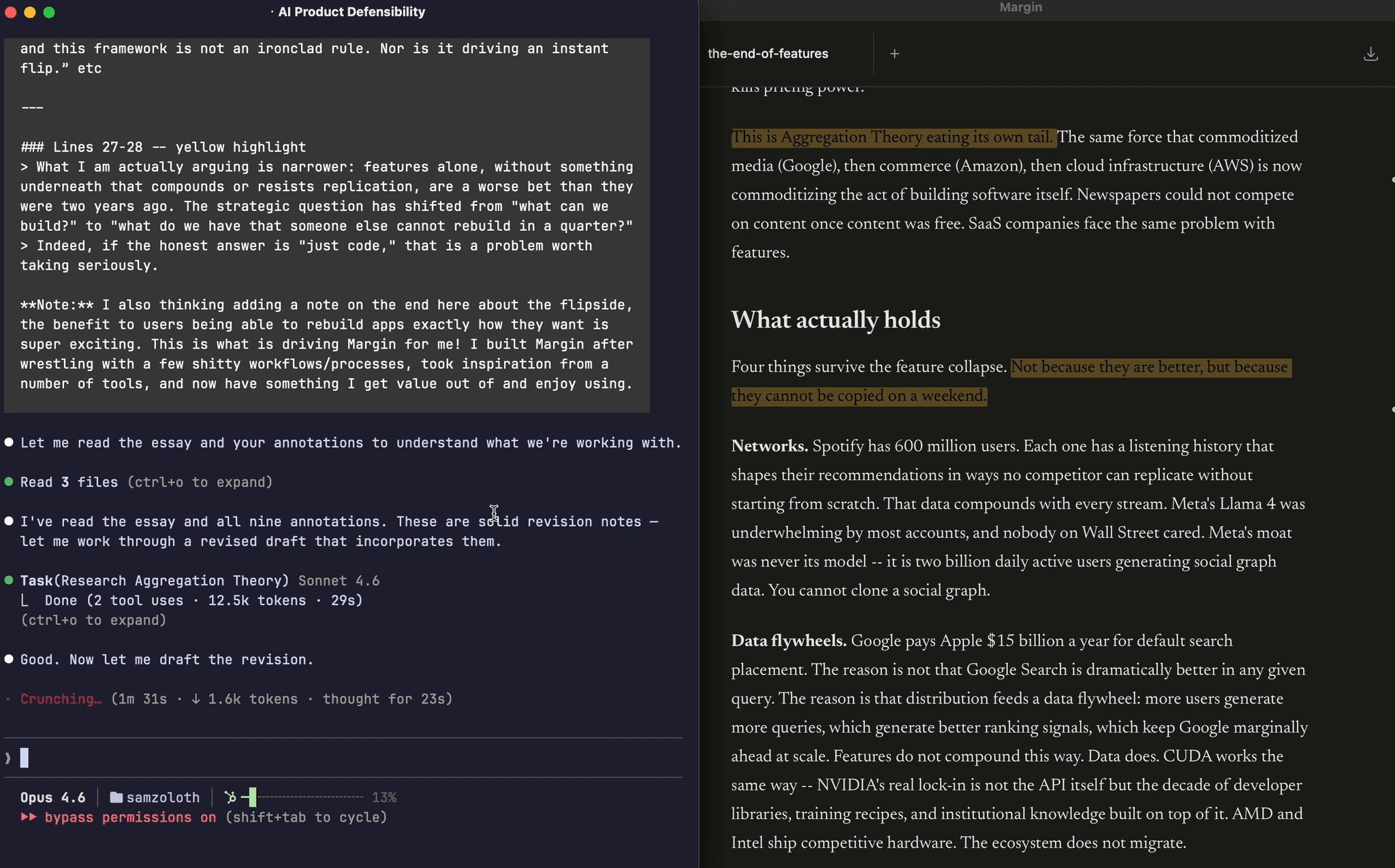
Margin is a Tauri + React desktop app for macOS. You open a markdown file, read it in a clean document view, and annotate: highlights in six colors, margin notes in the gutter, corrections with voice signals. The annotation layer lives in a local SQLite database alongside your files. There's no cloud sync, no telemetry, no account creation.
The core loop: annotate a draft, Margin extracts writing patterns, rules are written to ~/.margin/writing-rules.md, Claude reads the file before it writes. Over time, the file becomes a detailed specification of how you write, built from evidence rather than guesswork.
Scope
I built every layer: the desktop app, the annotation data model, the rule extraction system, the Python ML optimization pipeline, and the MCP server that connects Margin to Claude Code. The project runs as a real portfolio centerpiece, with all design decisions documented and all technical choices made with shipping constraints in mind.
Design system
Warm palette: paper over SaaS
The color palette was a deliberate choice, not a default. Margin's surface is off-white (#faf8f5), body text is warm near-black (#1a1a1a), muted text sits at a warm gray (#4a4540), and the accent is amber (#c4956a).
The goal was to make the tool feel like it belonged on paper, following the editorial tradition of iA Writer, Bear, and printed reading material, rather than inside another SaaS dashboard. Most productivity apps default to a cool, neutral palette (blue-grays, desaturated whites) that looks professional but generic. Warm neutrals are rarer on screens because they require more intentional color work; you can't just use the OS default. Building the palette from neutrals first meant the amber accent landed with purpose instead of competing for attention.
Warm isn't just aesthetic. Annotation tools are used for focused reading: you sit with a document, not scan a dashboard. A warmer environment reduces visual fatigue over long sessions. The palette choice was downstream of the use case.
WCAG contrast: a real failure, caught and fixed
During a design token audit, a 6-agent design swarm1 identified a WCAG AA contrast failure in the token system. The text-tertiary token, used for secondary labels and metadata, was sitting at 2.7:1 contrast ratio against the off-white background. WCAG AA requires 4.5:1 for normal text.
2.7:1 is not a borderline case. It's a real legibility failure for users with reduced contrast sensitivity, in bright-light conditions, or on lower-quality displays. The fix wasn't optional: I adjusted text-tertiary to 4.5:1 in the same commit that consolidated the type scale.
The same audit pass warmed semantic colors (success, danger, warning) to match the palette (green and red sat cooler than the amber accent, breaking visual coherence), consolidated a 10-step type scale down to a smaller set of intentional sizes, and added systematic shadow and radius tokens. Composite scoring across all changes gave a single number to measure against, using the same optimization structure as the autoresearch pass rate.
Type scale: simpler systems ship better
The original type scale had ten distinct steps. In practice, the app used a fraction of them, inconsistently. Consolidating to a tighter, documented scale made the UI more coherent (fewer visual weight decisions to make) and more maintainable (fewer tokens to track when adding new components).
This is the same instinct that shows up in the data layer. When annotation exports needed deduplication, the easy answer was to delete exported records. Instead, I added an exported_at timestamp column: exports are idempotent, history is preserved, re-exporting never loses work. The right primitive (a timestamp) costs almost nothing and prevents an entire class of bugs.
Chrome as ambient utility
The sidebar chrome collapses by default and reveals on hover. When you're reading, the interface recedes. When you need it, it's one cursor movement away.
The inspiration came from Arc, Dia, and Linear, each of which experimented with autohiding navigation in browsing and task contexts. Reading required a different calibration. Browsers can hide their tabs because tab-switching is intentional and episodic. A document reader needs to protect sustained attention. Any persistent visible element competes with the text, regardless of whether you're actively using it. Collapsing by default removes that competition.
The piece that made it viable was the Cmd+K command palette. Hiding chrome only works when commands stay reachable. Cmd+K centralizes commands (opening files, switching modes, exporting annotations) so new functionality lands in the palette instead of adding persistent UI. The interface stays clean as the feature set grows. Each command in the palette is one fewer reason to resurface chrome.
The palette started as a single scrolling list, every command occupying the same visual space. That worked when Margin had a handful of commands. As the feature set grew, scanning it required holding context the UI wasn't providing.
The redesign structured it as two columns: recent files on the left, actions on the right. File opening now routes through the palette entirely (both ⌘O and the + button), with filesystem search replacing the native file dialog. The left column answers "where was I?" The right answers "what can I do?" These are different cognitive modes, and collapsing them into a flat list pushed sorting work onto the user that belonged in the interface.
Raycast, Linear, and Arc make the same structural choice. Recency and action discovery are both useful, but they serve different moments in a workflow. A two-column layout makes that explicit without adding UI chrome.
The file search backing the palette runs on SQLite FTS5 — a full-text search extension that replaces sequential scanning with an inverted index. Benchmarking the upgrade showed a measurable latency improvement as the document library grows. Search stays fast enough to feel instant rather than merely responsive, which matters for a palette that's supposed to disappear while you're thinking.
Writing Rules
The core product mechanic is a feedback loop built from three moving parts.
Corrections are the raw input. When your AI writes something wrong (wrong tone, wrong phrasing, wrong sentence pattern), you highlight it and write a note. Margin captures the original text, your correction, and the surrounding context. Each correction is tagged with a writing type (general, email, prd, cover-letter, etc.) so rules stay scoped to the context where they matter.
Voice signals extend this. Not every correction means "stop doing this." Some mean "do more of this." A polarity system lets you mark corrections as positive (emulate this) or corrective (avoid this). The result is a two-sided specification: what to reach for and what to stay away from.
Rules are what the system produces. Corrections synthesize into concrete writing instructions, not vague preferences but actionable rules with examples and severity markers. Rules export automatically to ~/.margin/writing-rules.md. Point Claude at this file and your preferences are applied before it writes anything.
The loop runs continuously. Annotate a draft, close the app, open Claude: the rules are already updated. No synthesis step, no manual entry.
Taste Criteria
The polarity system initially treated positive and corrective annotations as two flavors of the same object. v1.16.0 formalized the positive side into a distinct entity.
Where a Writing Rule says "stop doing this," a Taste Criterion says "do more of this." Positive-polarity highlights are no longer just tagged; they become named, reusable entries in your writing profile — separate from the flagged-pattern pool. The profile exports as two partitioned sections: Taste Criteria at the top, Writing Rules below. The distinction matters for how an LLM consumes the profile. A model receiving both sections can reach toward your voice rather than only away from your mistakes. It changes what the profile specifies: not just an avoidance list, but a two-sided target.
The product model shifted from corrections-only to a two-sided specification. That shift changed what Margin fundamentally is: less a mistake-catcher, more a voice extractor.
Feedback types
Corrections started as undifferentiated objects. Whatever note you left on a highlight had the same schema weight: text in, text out, polarity flag. Enough to generate rules, but the data had no concept of what kind of correction you made.
I added a feedback_type column to the corrections table: an 8-type enum (question, suggestion, edit, voice, weakness, evidence, wordiness, factcheck). The taxonomy came from researching Hermes, an AI writing coach that structures feedback across similar dimensions. Rather than build types from scratch, I mapped Hermes' model to Margin's data layer. One week of competitive analysis, compressed into one schema decision.
The downstream UX follows from the type. Color-coded highlights signal feedback kind before you open the note. Filtering by type collapses a flat annotation list into a structured audit: every factcheck flag in one view, every voice deviation in another. In rule synthesis, types carry different weight: factcheck is higher-stakes than wordiness, and the rule engine reflects that when generating guidance.
Existing corrections default to null. Retrofitting a type onto prior records means inventing intent that was never captured at annotation time. null is a backward-compatible contract: prior sessions stay intact, type-aware features apply to all new annotations going forward.
The same Hermes research that informed the feedback taxonomy surfaced a second gap. Hermes closes its feedback loop inline: it shows you a suggested replacement and lets you accept it with one click, right where the feedback surfaces. Margin's corrections captured the suggestion but didn't close the loop — acting on it required a separate synthesis pass.
I added an Accept action to edit-type corrections. When a correction carries a suggested_edit value, an Accept button appears alongside the correction note. One click applies the replacement directly into the TipTap editor. The accepted state persists in the database; Dismiss remains available for corrections you want to log but not apply. The design principle is the same one Hermes uses: close the feedback loop where it surfaces, not in a separate flow.
Autoresearch
Writing rules only matter if they produce better output. The concrete question Margin needed to answer: given a set of rules and corrections, which prompt architecture makes Claude follow them most reliably?
Testing that by hand across nine writing types would take hours per iteration. So I built a system that runs it autonomously.
Architecture tournament
The autoresearch loop evaluates prompt architectures head-to-head. An agent proposes a single modification to the coaching prompt, a 27-sample evaluation harness scores the result against a compliance checker, and the system keeps or reverts the change based on pass rate. Each iteration takes about ten minutes. The loop runs unattended and commits its results to git.
Six architectures competed in the initial tournament: raw rules, exemplar-based learning, a two-pass editor, raw correction diffs, a hybrid approach, and a structured governance schema. Each architecture ran three times across 27 adversarial prompts to account for LLM variance. 258 corrections and 272 rules formed the evaluation data foundation.
The empirical results deviated from the prior expectation. Round-1 pass rates: arch-a 63%, arch-b 63%, arch-d 78%, arch-e 67%, arch-f 67%. Arch-d — raw correction diffs — won outright. The architecture expected to win, arch-e (corrections combined with high-signal rules), ranked third. The falsification protocol worked: the expected winner lost to a simpler approach.
Arch-d's win surfaced a known failure mode. Raw correction diffs leaked negative parallelism2 patterns in 2-3 samples per run. The governance schema variant (arch-f) eliminated the leaks but dropped overall pass rate to 67%. The production design borrowed arch-f's structured prohibition technique and grafted it onto arch-d's simpler prose format.
GEPA: self-improving rules
The autoresearch system went further with GEPA (Gap-Exposure Pattern Analysis). GEPA detects repeat correction patterns across sessions, diagnoses which rules are failing, and proposes fixes automatically. It found 7 vague rules and 6 near-miss variants in the existing rule set. After applying GEPA's fixes, pass rate moved from 78% to 85.2%.
The optimization runs on top of a custom DSPy BaseLM wrapper that calls claude -p (the CLI, not the API), requiring no API key, subscription-based. The self-improving loop costs nothing to run overnight.
Portability
The annotation layer on Margin's desktop produces structured data: corrections with context, voice signals, feedback types, rule synthesis. That data only matters if it reaches the tools you actually write with.
margin export coaching-prompt — added in v1.16.0 — generates a structured prompt from high-signal rules and annotated corrections. The format is portable: not a Claude-specific schema, not tied to any agent's configuration system, just a well-formed text prompt any system can consume. Run the export, and the next agent you prompt has your writing profile as input context. The MCP server uses a stateless design with evidence attribution — each rule traces back to the specific corrections that produced it, so an agent receiving the profile can weight rules by how much evidence backs them.
v1.16.2 completed the portability arc. The skill install pipeline and export format were generalized to work across agent runtimes: Claude Code receives rules via a pre-tool hook (mechanical enforcement before every write), Codex via AGENTS.md injection, generic MCP clients via prompt context. A single ~/.margin/writing-rules.md file sits at the center as the universal artifact. The underlying architecture decision — export a structured profile rather than bake in Claude-specific tooling — paid off: adding Codex support required a configuration addition, not a rewrite.
The full arc: annotate a draft on the desktop → corrections compound into rules → margin export coaching-prompt packages them → any agent you work with reads your voice.
What I'd Do Differently
Ship the MCP server earlier. The annotation data is most useful when it's accessible to agents in real time, not just exported to a file. Building the MCP server late in the project meant the early autoresearch runs couldn't query live correction history. The richer the context the optimizer has, the better the rules it produces.
Validate the core loop with real users before adding features. I shipped autoresearch, diff review, integrations, and MCP tools before testing whether the basic annotations-to-rules loop changed how anyone wrote. The product works, but I built a lot of surface area before proving the center.
Case study documented March 2026.
Footnotes
-
A 6-agent parallel review run using Claude Code subagents, each assigned a focused audit lens: contrast ratios, type scale, spacing tokens, semantic color coherence, shadow/radius tokens, and composite scoring. ↩
-
A specific AI writing tell: "it's not X, it's Y" or "the hard part isn't X, it's Y." The pattern signals AI-generated reasoning more reliably than most other tells because it's structurally unusual in natural prose. ↩