Teach your AI how you write
Mark up AI-generated text with corrections, voice signals, and writing rules. Margin turns your feedback into a style guide your AI actually follows.
for macOS · Free & open source
Margin with highlights and margin notes
Most AI writing tools try to fix your words after the fact. Margin works the other way — you mark up what's wrong, and your corrections compound into rules your AI follows before it writes.
Built for annotating
If the tool doesn't feel good to sit in, you won't annotate. If you don't annotate, your AI never learns.
Typography and measure
A 65-character measure, generous line-height, dark mode. Your markdown files become pages worth sitting in.
Six colors of thought
Highlight passages in six colors. Write margin notes in the gutter. Undo anything. Each color can carry its own meaning.
Local-first, always
Files stay on disk. Annotations live in a local SQLite database. No account, no cloud, no telemetry. Open the database yourself — it's just a file.
First-run onboarding
A sample document loads on first launch so you can explore highlights, corrections, and voice signals before opening your own files.
Style Memory
The biggest gap in AI writing isn't capability — it's that your AI doesn't know what you sound like. Style Memory closes that gap. React to what your AI gets wrong, and your preferences compound into a system it actually follows.
Corrections
When your AI writes something wrong — wrong tone, wrong phrasing, wrong instinct — highlight it and add a note. Margin captures the original text, your feedback, and the surrounding context. Tag each correction with a writing type so rules stay scoped.
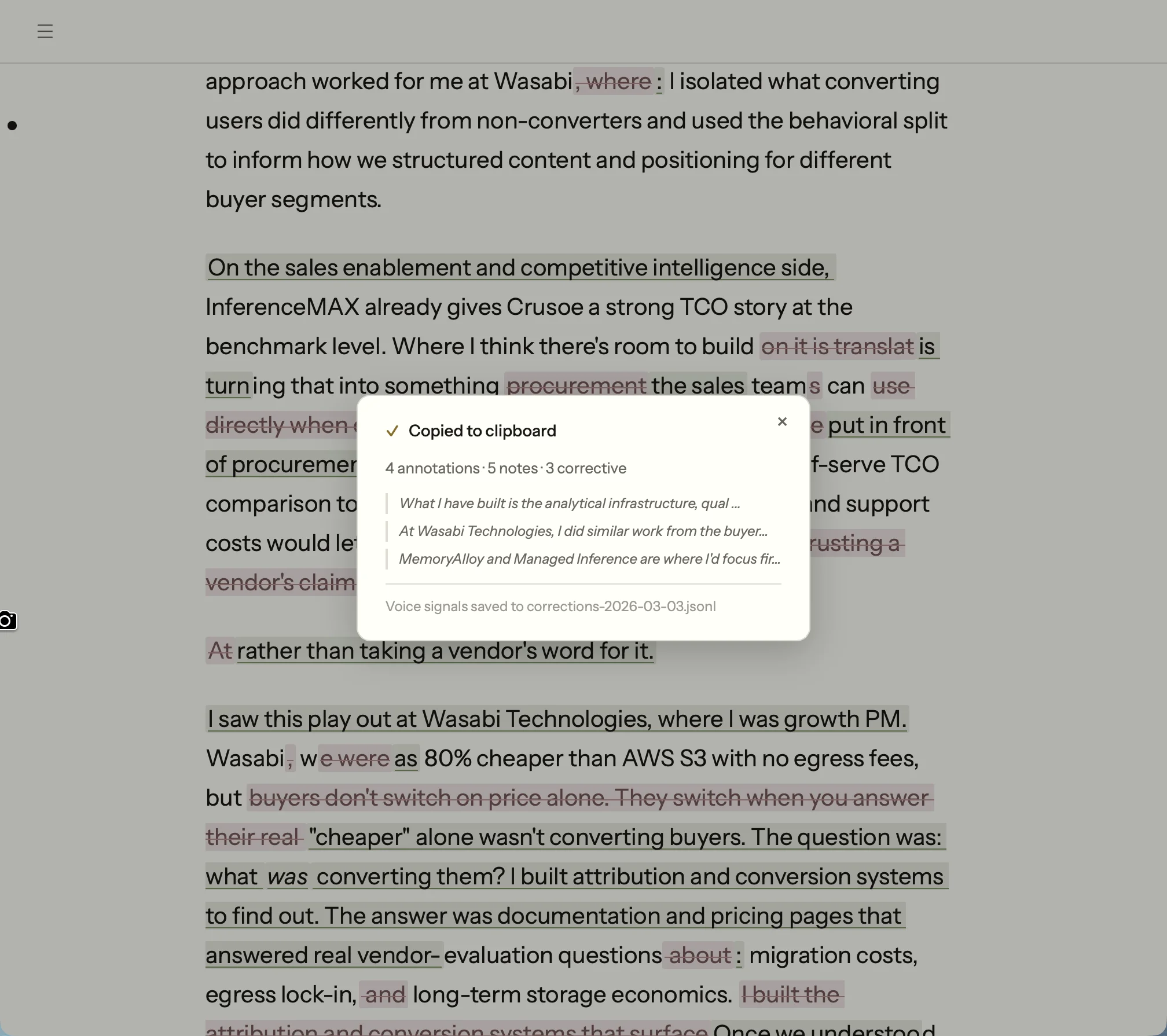
Corrections with voice signals exported to file
Voice signals
Not every correction means "stop doing this." Some mean "do more of this." The polarity system lets you tag corrections as positive (emulate this) or corrective (avoid this). Your AI learns both what to reach for and what to stay away from.
Positive
"This opening is exactly the right energy — conversational, mid-thought, no preamble."
Corrective
"Never use 'furthermore' — it's an AI transition tell."
Rules and export
Corrections synthesize into writing rules — concrete instructions your AI can follow. Rules auto-export to ~/.margin/writing-rules.md. Point Claude at this file and it reads your rules before writing anything.
# Writing Rules

_For AI agents: apply rules matching the writing type._
_General rules always apply._

## General

### Voice Calibration

**Rule: Almost never end messages with periods
(~0.8%). This is the single strongest voice
signal.** [must-fix]
- When to apply: All casual and semi-formal writing
- Why: Periods on short messages are the #1 AI tell
- Signal: seen 10 time(s)

### Ai Slop

**Rule: Eliminate sentence patterns that signal
AI-generated text.** [must-fix]
- Before: "The deeper issue isn't that AI features
  are hard to build in-house. It's that AI makes it
  trivially easy..."
- After: "AI makes it trivially easy for anyone to
  reverse-engineer product surface area."

### Authenticity

**Rule: Remove any claim you do not genuinely
believe or cannot defend with your own
experience.** [must-fix]
- Why: Readers and interviewers will probe claims;
  inauthentic ones collapse under scrutiny.
Auto-synthesis
Every correction you mark automatically becomes a writing rule. Mark something as corrective and Margin extracts the pattern, writes the rule, and adds it to your profile — no synthesis step, no manual entry. Annotate a draft, close the app, open Claude: your rules are already updated.
Seed from a style guide
Already have a style guide? Paste it in or upload the file. Margin runs it through an extraction pass, pulls out discrete rules, and adds them to your profile. Skip the cold start — your AI follows your existing standards from day one.
Writing guard hook
Margin generates a Claude Code hook that blocks kill words automatically. Every time Claude tries to write "leverage" or "furthermore," the hook intercepts the edit before it lands.
# ~/.claude/hooks/margin-writing-guard.sh
# Auto-generated by Margin — regenerated on rules export

KILL_WORDS=("leverage" "utilize" "furthermore"
            "moreover" "additionally")

for word in "${KILL_WORDS[@]}"; do
  if grep -qi "$word" "$1"; then
    echo "BLOCKED: '$word' violates your writing rules"
    exit 1
  fi
done
Your corrections compound
What you can do with it
Margin's MCP server exposes your documents, annotations, and rules to Claude. These are real workflows, not hypotheticals.
Writing review
Review my writing rules and tell me which ones this draft violates
Claude reads your exported rules and audits a draft against them.
Annotation analysis
I just exported from Margin — review the annotations and give me revision notes
After exporting highlights and notes, Claude turns them into actionable edits.
Quality dashboard
Run a compliance check against my writing rules and score this draft
Real-time compliance scoring across your rule set, with progress feedback and specific violations surfaced.
Pattern detection
What patterns are showing up in my corrections this month?
Claude surfaces recurring mistakes across your correction history.
Automated annotation
Add a margin note to every paragraph that uses passive voice
Claude reads a document through MCP and annotates it programmatically.
Diff review for AI edits
Claude Code edits your file. Margin notices. An FSEvents watcher detects changes, shows a diff banner, and renders inline diffs with green insertions and red deletions. Review each change and keep or revert it — one hunk at a time.
20+ MCP tools
Your documents, annotations, corrections, and writing rules — exposed to any MCP-compatible AI client. Read files, create highlights, search across your library, export rules as prompt-ready markdown.
// Example: highlight text and attach a note
{
  "tool": "margin_highlight_by_text",
  "arguments": {
    "document_id": "abc-123",
    "text_to_highlight": "We leverage AI to optimize",
    "color": "pink",
    "note": "Kill this. Say 'we use AI to save time.'"
  }
}Autoresearch
Writing rules only matter if they produce better output. The question Margin needed to answer was concrete: given a set of rules and corrections, which coaching prompt architecture makes Claude follow them most reliably? Testing that by hand across nine writing types would take hours per iteration. So I built a system that does it autonomously.
The autoresearch loop works like this: an agent proposes a single modification to the coaching prompt, a 27-sample evaluation harness scores the result against a compliance checker, and the system keeps or reverts the change based on pass rate. Each iteration takes about ten minutes. The loop runs unattended overnight and commits its own results to git.
Architecture tournament
The system evaluated eight prompt architectures head-to-head: raw rules, exemplar-based learning, a two-pass editor, raw corrections, a hybrid approach, a structured governance schema, and two production variants. Each architecture ran three times across 27 adversarial prompts (nine writing types, three samples each) to account for LLM variance.
8
Architectures tested
500+
Total samples scored
4% → 41%
Proxy catch rate
70.4%
Final pass rate
Architecture E (corrections + high-signal rules) won the initial tournament at 72.3% pass rate. But it leaked negative parallelism patterns in 2-3 samples per run. Architecture F used a JSON governance schema that eliminated those leaks completely, but dropped overall pass rate to 63.9%. The winning design borrowed F's structured prohibition technique and grafted it onto E's simpler prose format.
Calibrating the proxy
Halfway through optimization, I realized the compliance checker was only catching 4% of the issues I would flag by hand. A 70% pass rate against a weak proxy is meaningless. I ran a calibration study: generated 27 samples, corrected them in Margin the same way I would any draft, then compared my corrections against what the proxy caught. The gap revealed six missing check categories (em dash overuse, colon density, missing terminal punctuation, three new negative parallelism variants, AI slop patterns, and hyperbolic claims). After adding them, catch rate went from 4% to 41%.
The recalibrated proxy dropped the pass rate from 70% to 46%. That was the point. The system was now optimizing against checks that reflected real editorial judgment, not a feel-good metric. Within one session of continued optimization, the pass rate climbed back to 70.4% against the harder standard.
Optimization trace
Every run records its hypothesis, metrics, and whether the change was kept or reverted. The loop commits results to git automatically, so the full history is auditable.
run  pass_rate  mean_dim  hypothesis            kept
001  0.519      46.2     baseline (rules only)  true
004  0.769      46.5     hybrid: corrections     true
                         + high-signal rules
008  0.464      46.0     calibrated proxy        true
                         (10x catch rate)
012  0.704      47.1     + length constraints    true
                         + expanded prohibitions
Architecture H: self-improving rules
Optimizing the coaching prompt raised pass rate, but the rules themselves were still the bottleneck. Some rules were too vague for Claude to act on reliably; others were catching some violations but missing near-identical variants. To fix this, I built GEPA — Gap-Exposure Pattern Analysis — a layer that runs on top of the evaluation harness and diagnoses rule failures automatically.
GEPA works by cross-referencing failed samples against the active rule set: when the same correction pattern appears in three or more failures without a matching rule, it flags a gap. When a rule exists but violations still leak through, it diagnoses vagueness. On the first run, GEPA identified 7 vague rules and 6 near-miss variants that the proxy was missing entirely.
For the optimization layer I chose DSPy over fine-tuning. Fine-tuning would have required a separate API key, a labeled dataset, and compute costs that compound with every iteration. DSPy wraps the same claude -p CLI call I was already using — no API key, no incremental cost, runs on subscription. MIPROv2 optimized the instruction set across all nine writing types concurrently in a single overnight session.
72.3%
Before GEPA
85.2%
After GEPA + DSPy
The 12.9 percentage point gain came entirely from fixing the rules, not the prompt. Architecture H is the same coaching format as E, with GEPA-rewritten rule definitions and DSPy-optimized instruction phrasing. The feedback loop is now closed: corrections generate rules, rules feed the eval, the eval surfaces gaps, GEPA rewrites the rules.
Why a study loop
A static set of rules would have been simpler. But static rules can't answer "does this phrasing actually reduce AI slop?" The autoresearch loop treats coaching prompt design as an empirical question: propose a change, measure the effect, keep what works. The system improves its own coaching without manual intervention.
This is the same pattern behind any good ML pipeline: define a metric, build a fast eval, iterate against it. The difference is that the metric here is editorial taste, calibrated against a human writer's actual corrections.
Works the way your Mac does
Default .md handler
Double-click any markdown file. It opens in Margin.
Quick launch
Open recent files from Raycast, Spotlight, or the command line.
File watcher
Edit the file in another app. Margin picks up changes without reloading.
Claude Desktop toggle
Enable the MCP server from Margin's preferences. No config files needed.
Auto-updater
Margin checks for updates on launch and installs them in the background.
Design craft
Margin's palette is warm and editorial — amber accent, off-white surface, near-black text. The goal was something that felt like it belonged on paper rather than inside a SaaS dashboard. Building from neutrals first meant the accent landed with purpose instead of competing for attention.
A 6-agent design swarm audited the token system and found a WCAG AA failure: text tertiary was sitting at 2.7:1 contrast. Fixed to 4.5:1. The same pass consolidated a 10-step type scale down to a tighter set, warmed semantic colors (success, danger, warning) to match the palette, and added systematic shadow and radius tokens. Composite scoring across all changes gave a single number to optimize against — the same structure as the autoresearch pass rate.
The instinct shows up in the data layer too. When annotation exports needed deduplication, the easy answer was to delete exported records. Instead, I added an exported_at timestamp column: exports are idempotent, history is preserved, and re-exporting never loses work. Design tokens and data models reward the same habit — fix the root cause rather than papering over it.
Your AI should write like you
Free, open-source, and yours to keep.
Built by Sam Zoloth. Source on GitHub.